
Meet Genie: AI Built for Real FileMaker Work
Meet Genie, a FileMaker AI assistant delivered through a local workbench. Preview XML, apply deliberately, and keep FileMaker development grounded in live context.

Genie started from a workflow many FileMaker developers already use: copy, paste, test, iterate.
The problem is that generic AI tools still struggle with FileMaker-specific structure, especially XML logic, schema dependencies, and script conventions. Results can be useful, but often need cleanup before they are safe to apply.
Genie is our answer: a FileMaker-aware shell with guardrails, review boundaries, and a practical apply workflow, delivered through a FileMaker plug-in.
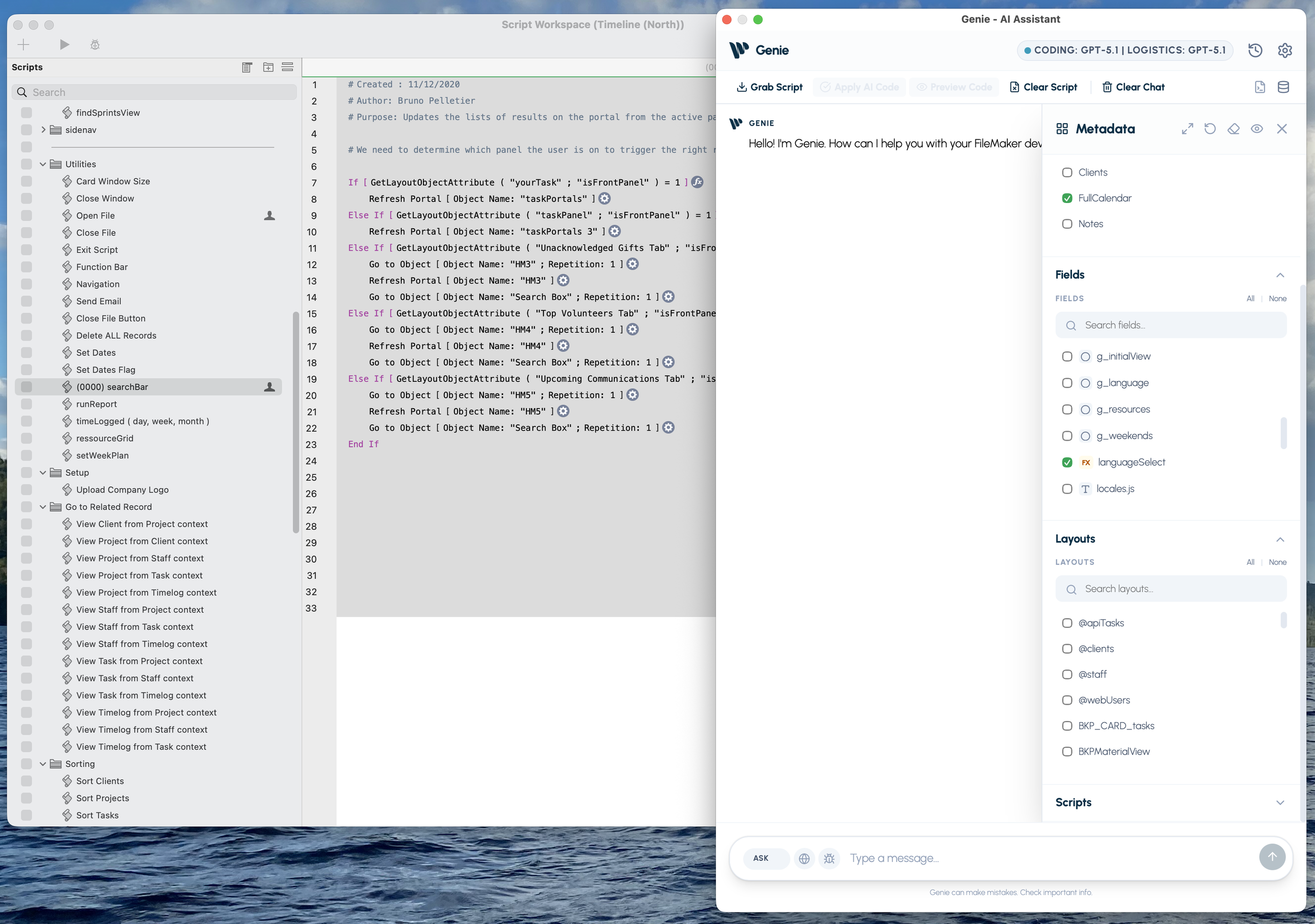
Genie in action inside the FileMaker workflow.
What Genie is
Genie is not trying to be an AI model provider. We are building a FileMaker-first integration layer so the model you choose can work with better context, better validation, and more reliable output.
That means:
- Better FileMaker-aware context handling
- Predictable generation and validation flow
- Clear review/apply boundaries before anything changes
What Genie Does Today
Understands Real FileMaker Context
- Metadata Explorer with live sync for tables, fields, layouts, scripts, and custom functions
- Built-in FileMaker knowledge for script steps, calculations, and error codes
- Script dependency extraction across table occurrences, tables, layouts, scripts, and custom functions
Works Directly in the Script Workspace
- Grab script lines or full scripts from the script workspace
- Copy, paste, and edit Script XML directly
- Generate script snippets, script parts, full scripts, or multiple scripts in one flow
- Import and use custom functions
Applies with Safety Controls
- Structural guardrails to protect script flow during generation and repair
- Automatic validation and model-assisted XML repair before apply
- Targeted repair of affected steps instead of rewriting everything
- Warnings for unknown step IDs before apply
- Preflight clarification when requests are incomplete
Supports ASK, Query, and Data Work
- Ask FileMaker questions and get quick guidance
- Debug and troubleshoot scripts
- Web Search mode for up-to-date references with source links
- Natural-language Query with read-only protection and FileMaker SQL checks
- Natural-language Data and schema changes with confirmation guardrails
- Table, chart, and raw outputs with CSV/PNG export
Gives You Model and Budget Control
- Two-stage CODE pipeline with separate settings for planning and coding
- Supports Anthropic, Google, OpenAI, and custom providers
- Provider, model, and effort selection by role
- Budget controls for context and output limits
- Developer Trace for request/response visibility
Our goal
We are building a fully integrated AI experience for real FileMaker development, not a demo layer.
Developers already use AI in other ecosystems because it improves speed and reduces repetitive work. We want that same productivity in FileMaker, without losing control or output quality.
We have already embedded core FileMaker rules, conventions, and structure into Genie. Our long-term vision expands beyond scripts into layouts, calculations, and broader solution workflows.
Platform and model support
- Platform support today: macOS (Windows planned)
- Model-agnostic by design: OpenAI, Anthropic, Google, and local/custom setups
See the full tour and supported workflows on the Genie page.