
Data Privacy for AI in FileMaker: Your Records Stay in the File
Genie's new Security page decides what AI agents can read from your FileMaker files: everything, the structure only, or only the items you pick, saved for each file. It holds for Genie, Claude Code, Codex, Cursor and your MCP apps. How it works, what it covers and what it doesn't.
Data privacy is the first question every FileMaker team asks about AI. Most FileMaker files hold someone else’s information: patients, clients, employees, invoices. The team would like the help, but they can’t send those records to an AI provider, and often they’ve promised their own clients they won’t.
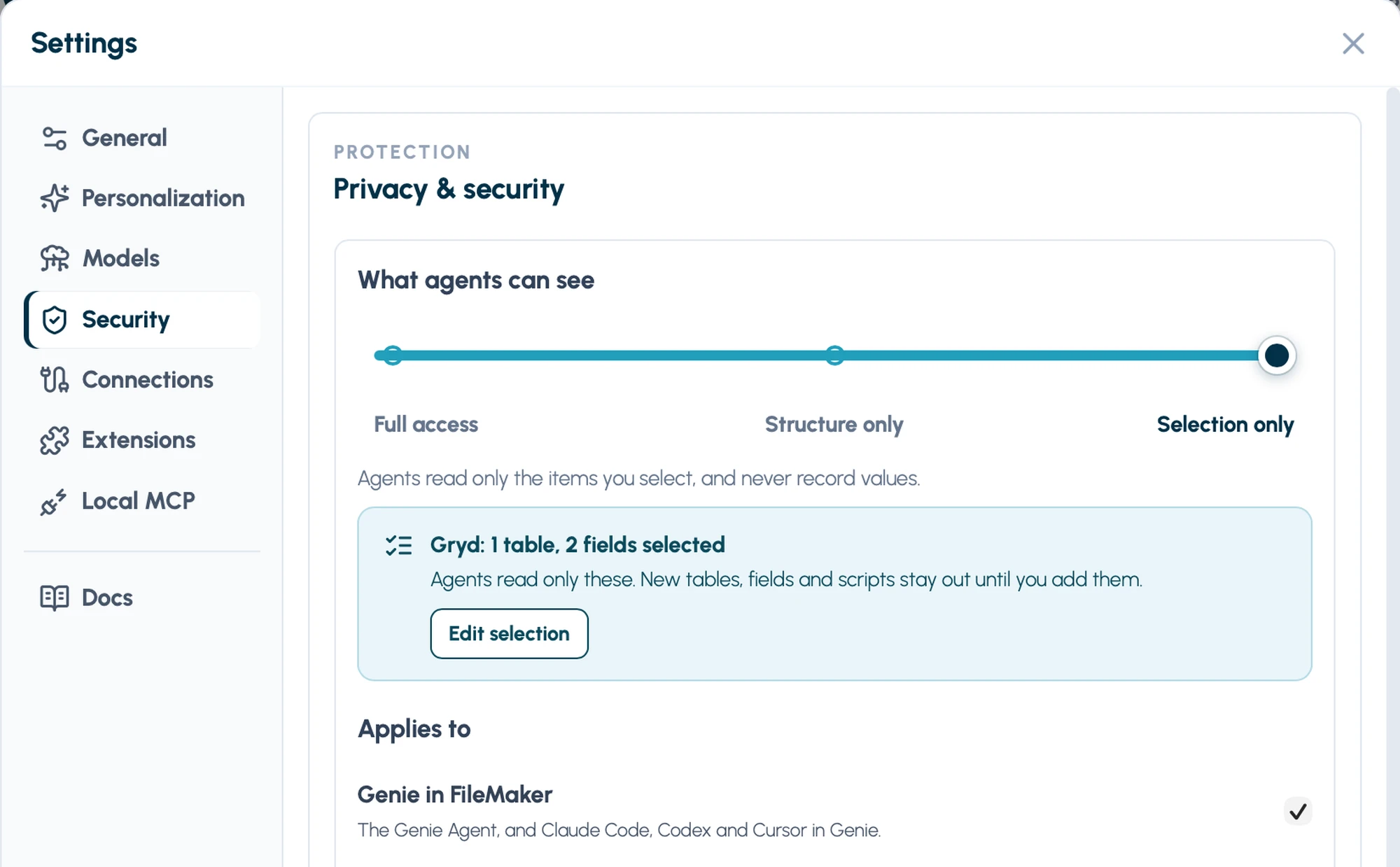
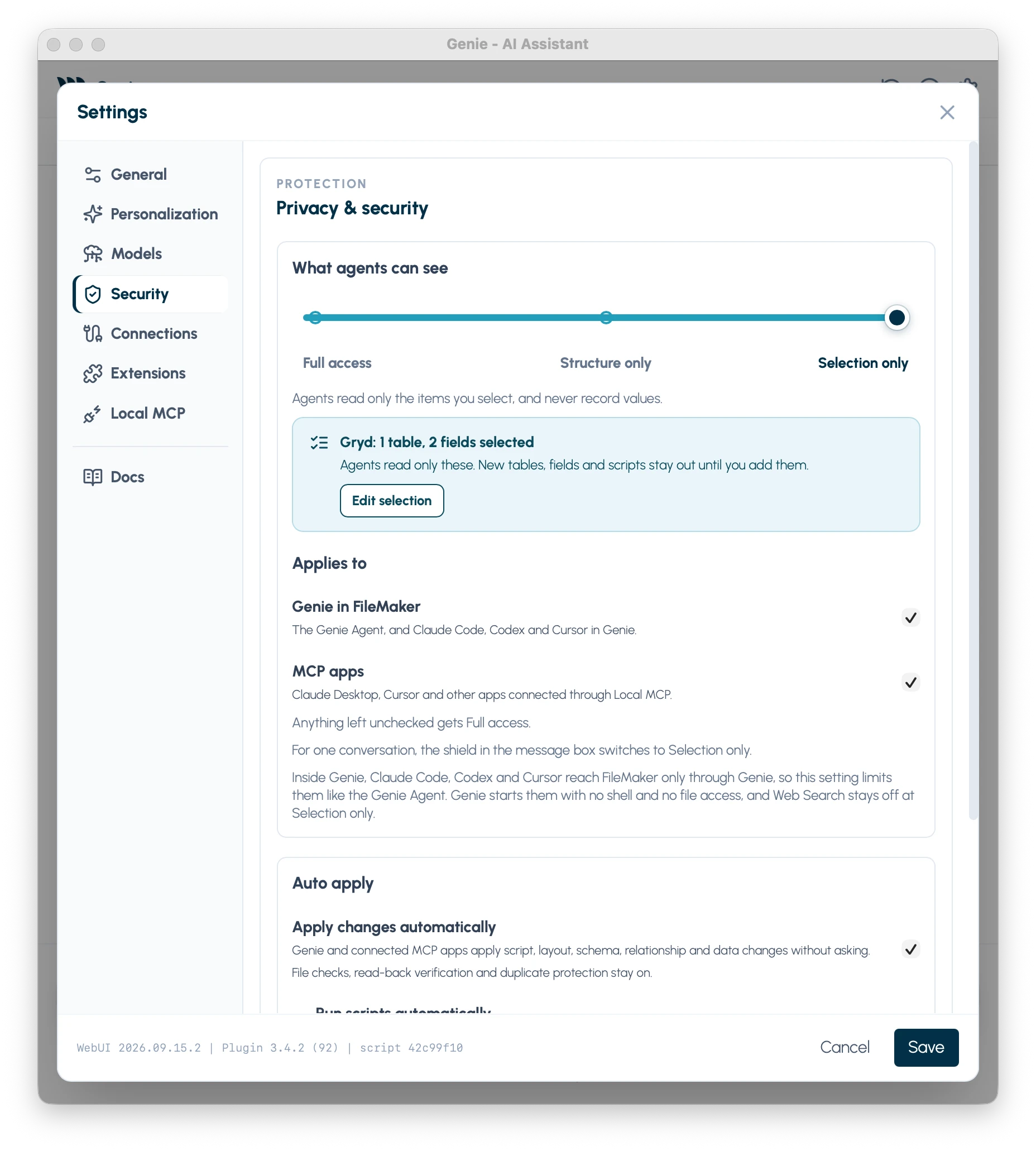
Genie 3.5 answers that question on one page. Settings › Security has a single slider, What agents can see, with three stops: Full access, Structure only and Selection only. At Structure only, no agent working through Genie ever receives a field value, a row or a calculation result, and every agent keeps working on your solution itself: its scripts, layouts, fields and relationships. At Selection only, agents read only the items you pick, and Genie remembers that choice for each file.
This post covers how that works and, just as important for privacy, what it doesn’t cover.
Why privacy can’t rely on “just don’t paste anything”
An agent that builds in FileMaker reads the file to do its work. To fix a script, it reads the script. To check a calculation, it may run it. To understand a table, it may query a few rows. Each of those reads can carry a name, an address or a diagnosis to the AI provider, without anyone pasting anything. That is a privacy leak nobody chose.
Telling people to be careful doesn’t fix that. The limit has to sit where the agent reads the file, so that is where Genie puts it.
Three levels on one slider
- Full access is the default. Agents read your structure and your records.
- Structure only keeps every record value out. This is the everyday setting for a file with real client data.
- Selection only goes further: agents read only the tables, fields and scripts you select, and still no record values.
Under the slider, Applies to has two checkboxes: Genie in FileMaker (the Genie Agent, and Claude Code, Codex and Cursor in Genie) and MCP apps (Claude Desktop, Cursor and other apps connected through Local MCP). Uncheck one and it gets Full access. That lets you lock down outside apps while you keep working normally in Genie, or the reverse.
Structure only: the agent builds, the records stay
At Structure only, agents can still read and build scripts, layouts, fields, custom functions, value lists and relationships. Genie no longer gives them:
- field values or query rows;
- record counts or found counts;
- calculation results;
- the fields of the current record.
Here is what that looks like in practice:
- Query runs only on FileMaker’s own schema tables, so the agent can still learn which tables and fields exist.
- Evaluate checks that a calculation is valid without running it.
- Scripts still run after you confirm them, but their results don’t come back to the agent. Every run asks you first, even if you normally let scripts run automatically.
- Data changes always wait for your review, even with Auto apply on, and the preview doesn’t show how many records they affect.
Selection only: only what you pick, saved for each file
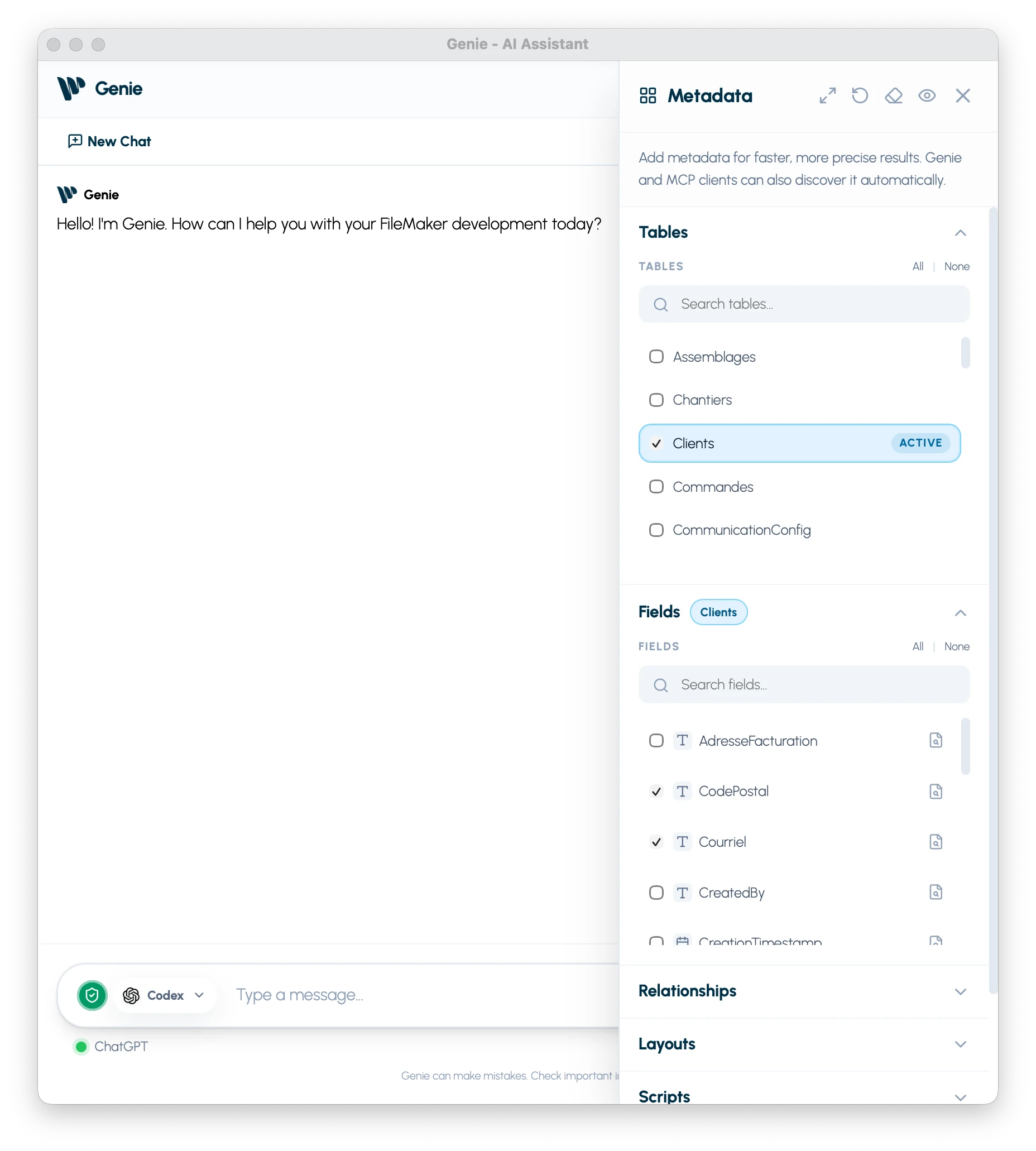
Choose Selection only and a banner appears under the slider. The first time, it says Agents can’t read anything in this file yet, because an empty selection means no live reads at all. Click Choose items and Genie opens Metadata Explorer, where you tick the tables, fields and scripts the agent may read.
A few rules make the selection hard to widen by accident:
- Selecting a table doesn’t include its fields. Each field is chosen on its own.
- Nothing in a prompt can widen the selection.
- New tables, fields and scripts added to the file later stay out until you add them.
Genie saves the selection for each file. It comes back after New Chat and after you quit and reopen FileMaker, and the banner then shows what is selected, such as “1 table, 2 fields selected”, with Edit selection.
Claude Code, Codex and Cursor in Genie keep working at Selection only. They reach FileMaker only through Genie, so their reads are limited to the selection exactly like the Genie Agent’s. Genie starts them with no shell and no file access, and Web Search stays off at this level. Asked to read a field that isn’t selected, they get a refusal, not the field.
Your project guidance, the naming rules and notes you wrote for the file, is still sent at every level. It is your own text, not data from your records.
A different level for one file
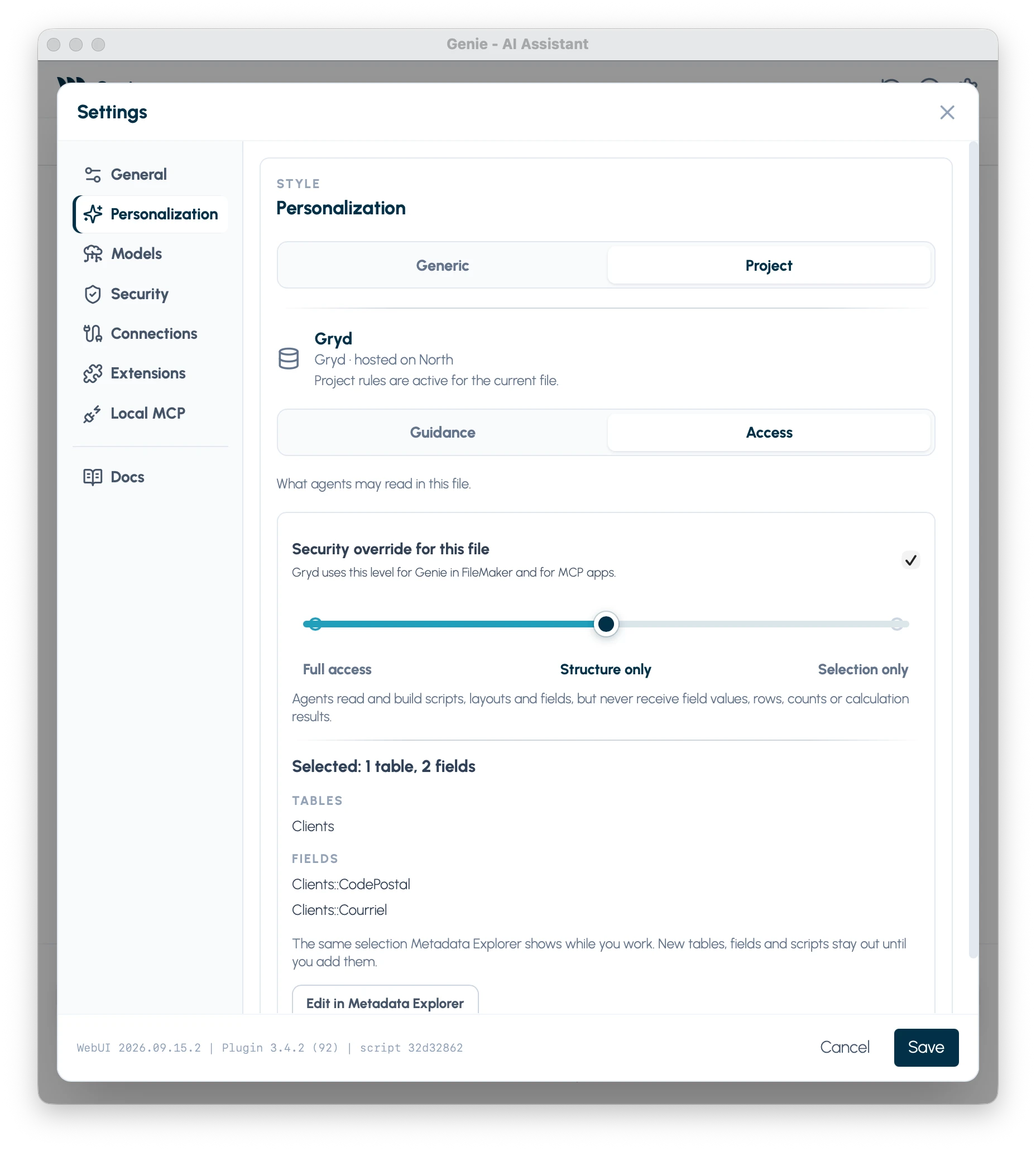
Some files need more care than others, and some need less: a demo file full of sample data, say. In Settings › Personalization › Project, the Access tab has Security override for this file, with the same slider. It replaces your Security setting for that file only, for Genie in FileMaker and MCP apps alike. It can be stricter or looser. The same tab lists the file’s saved selection, with Edit in Metadata Explorer.
The shield in the message box
The shield at the left of the message box is the quick way in. At Full access or Structure only, clicking it switches the current conversation to Selection only, and clicking it again switches it back.
When the level itself is Selection only, the shield is already on and stays on. Turning it off asks first:
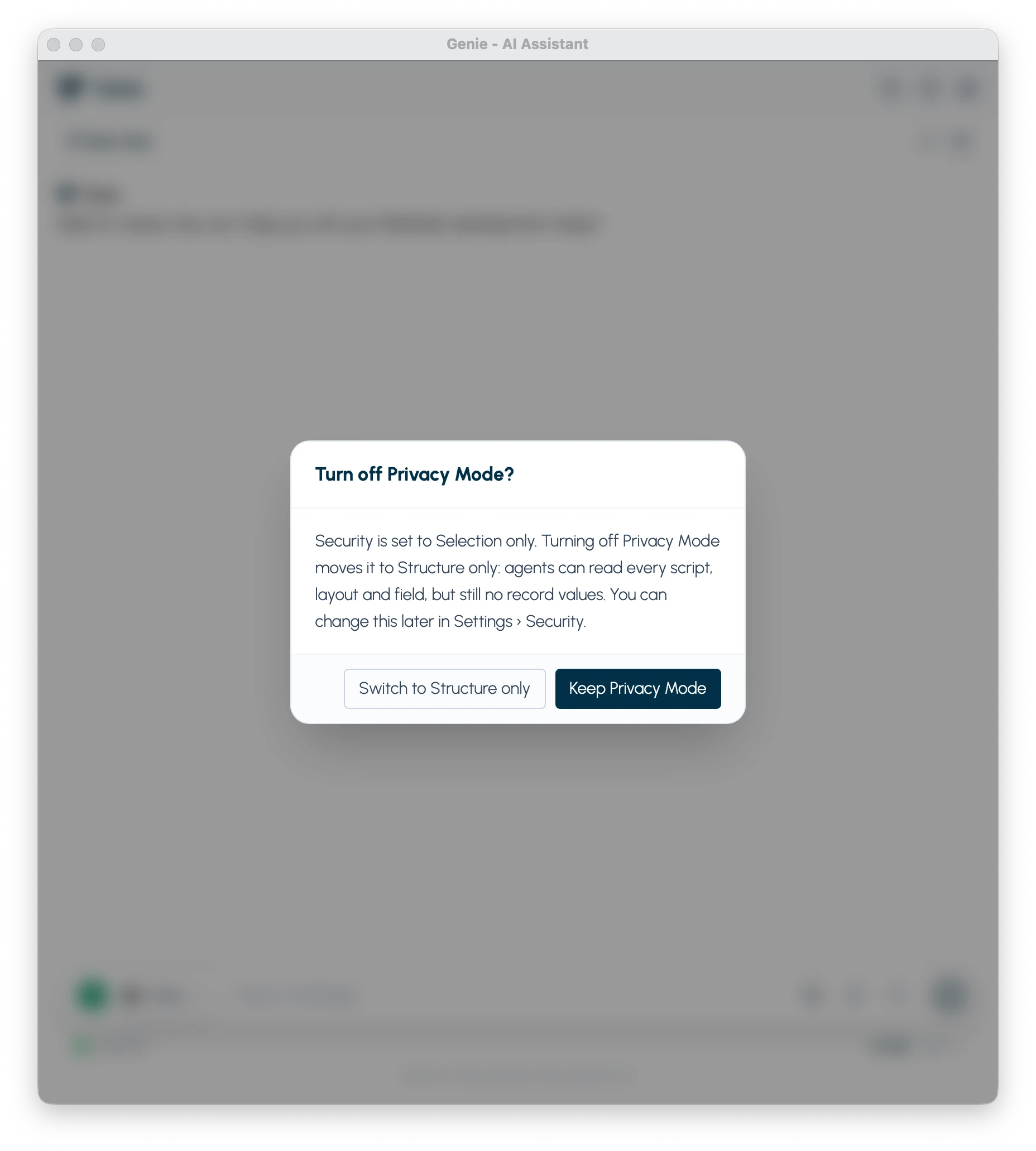
Switch to Structure only moves that level, the file’s or your Security setting, down one step. It never jumps to Full access.
Whenever the level gets stricter, Genie stops the current request and starts fresh, so nothing an agent saw before the change is sent to the model again.
If you already used Record data or Privacy Mode for MCP apps, your settings move over by themselves, and never end up less strict than before.
What it doesn’t cover
We would rather say this plainly than let a privacy setting promise more than it does. The Security page doesn’t control:
- what you type or paste into a prompt;
- values already sent to a provider before you changed the level;
- data written into the structure itself, such as custom values in a value list, text in a script or calculation, or text on a layout;
- other MCP servers on your Mac, or, below Selection only, apps you add in Connections.
It is a Genie setting on your Mac. Your FileMaker accounts and privilege sets remain the real access control.
Geniewave never receives your data
Genie runs inside FileMaker on your Mac. When an agent works, the request goes from your Mac to the AI provider you chose, never through Geniewave. Your records, your scripts and your conversations don’t reach our servers.
What does reach Geniewave is short and on your terms:
- Your licence check, for a paid plan: your licence key and this Mac, nothing about your files.
- The update check, which reads which Genie version is current.
- Product issue reports, if you leave them on. When a tool fails, Genie can send which tool failed, your versions and a short summary. At Structure only, the free-text parts are dropped. Selection only turns reports off, and Settings › Security › Report issues turns them off for good.
Genie doesn’t resell AI either. You use your own provider key, or your own Claude, ChatGPT or Cursor plan, so your requests go under the terms you already accepted with that provider. Combined with Structure only or Selection only, those requests carry the design of your solution, not the people in it.
You decide what leaves your Mac, and where it goes.
Try it
- Update to Genie 3.5. Genie offers the update, or download it.
- Open Settings › Security and move the slider to Structure only.
- Ask the agent to build something in a copy of a real file, and watch what it reads.
- For a file that needs more, choose Selection only, click Choose items and tick what the task needs.