Genie 2.3: AGENT Mode for FileMaker
Genie 2.3 introduces AGENT mode for FileMaker: live reads from the open file, FileMaker 19-to-current compatibility, in-app help, Compact AGENT, Local MCP, charts, documents, analysis, and reviewed creation.
Genie started as a practical way to bring AI closer to real FileMaker development. Not a generic chat window next to your database. Not another place where you paste half a script, explain your schema from memory, and hope the answer happens to match the file in front of you.
With Genie 2.3, the big release story is AGENT mode.
AGENT mode is built around a simple idea: FileMaker AI should be able to read the context it needs from the file you are actually working in.
That means less manual setup, less copy-paste, fewer long context prompts, and more useful output from the first request.
That is the difference between a chat window and a FileMaker AI workflow.
Genie is still the product. AGENT mode is the new capability that makes Genie feel much more native: live FileMaker context, in-app AI assistant, the Genie Script Workspace Compact AGENT, reviewed Workbench, Local MCP, project rules, provider choice, plugin compatibility, calculation help, custom function help, reports, charts, documents, and controlled script creation in one workflow.
It also matters because Genie is designed for real FileMaker files, including systems from FileMaker 19 through current releases.
Newer FileMaker versions may unlock more native actions. But the point of Genie is not to help only brand-new demo files. The point is to help with the systems developers already maintain.
This release also comes with a monthly Solo option, making it easier to move from free inspection into real client work before choosing a longer commitment.
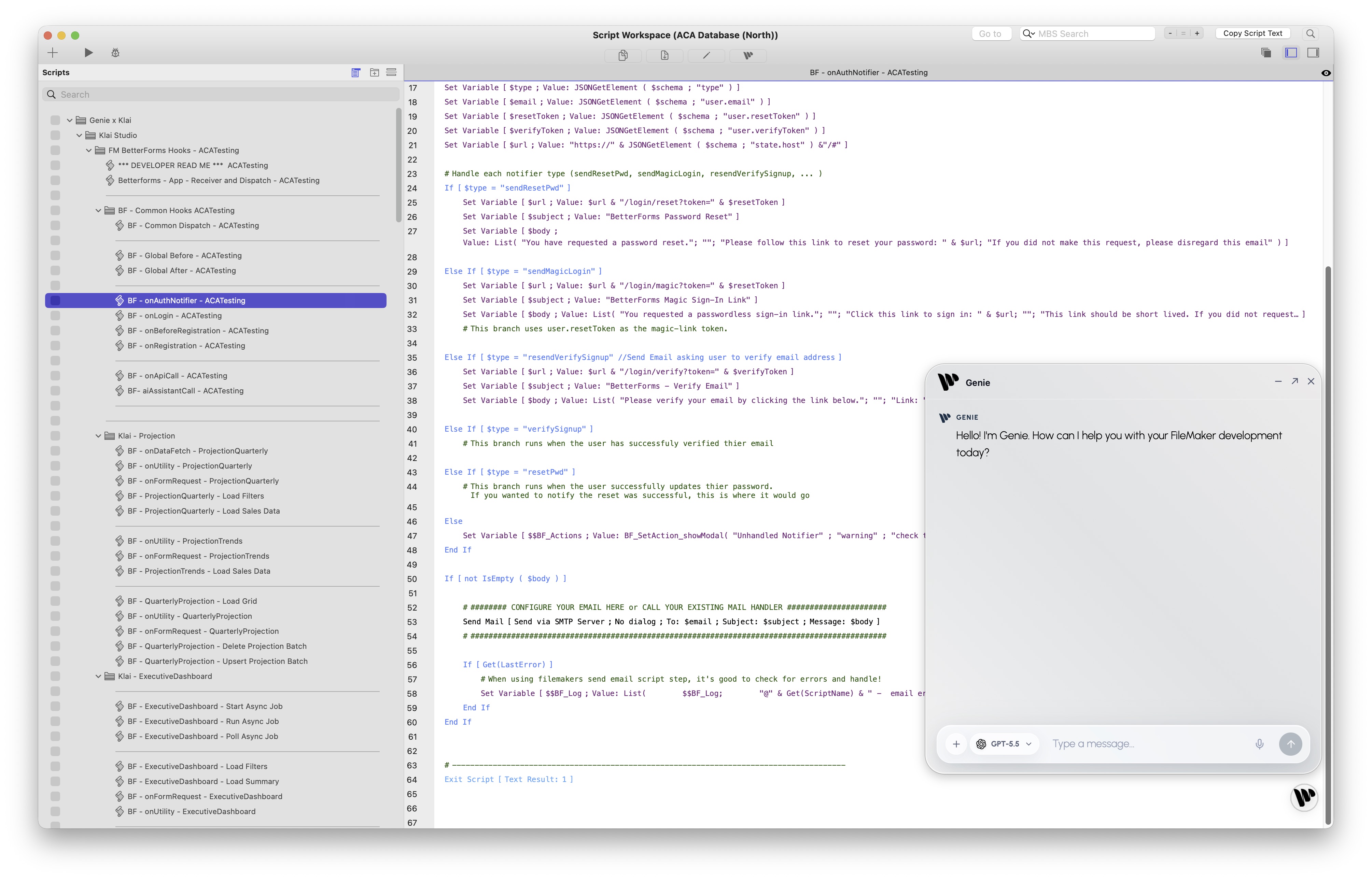
Genie AGENT mode can work beside FileMaker, read live context, and keep the final action reviewed.
The old problem: AI was blind to FileMaker
FileMaker developers already know the loop:
- copy script steps;
- describe the file;
- paste field names;
- explain layouts;
- remind the model how FileMaker scripting works;
- fix the generated result;
- repeat.
That can be useful, but it puts the work on the developer. The model does not really know the system. It only knows the slice of context you had time to copy.
Genie 2.3 is designed to remove as much of that manual context work as possible.
Genie can work from the active FileMaker target, selected Script Workspace context, metadata, layouts, calculations, custom functions, safe query results, project rules, and the same Local MCP layer used by external tools. The point is not magic. The point is grounded work.
Compatible from FileMaker 19 to now
This is a big part of the value.
Genie is built for the FileMaker community as it actually exists: current files, older production files, client systems that cannot instantly upgrade, plugin-heavy systems, and long-running business apps that still matter.
The compatibility story is FileMaker 19 through current releases.
Newer FileMaker versions can unlock richer native options and newer AI features, but AGENT mode is not only for the newest possible platform demo. Genie is designed to help with the file you have open now.
Genie understands before it writes
The real shift is that AGENT mode can understand the FileMaker system before preparing work.
Instead of asking a model to guess from a prompt, Genie can let the agent inspect what matters first:
- open file context;
- scripts and selected Script Workspace steps;
- tables, fields, relationships, layouts, value lists, and custom functions;
- project conventions, naming rules, and developer instructions;
- plugin-aware context when your workflow depends on common FileMaker plugins;
- safe read-only data queries when the task needs evidence;
- supported handoff paths such as Preview, Copy, Create Script, Apply, Run, or MCP staging.
That context changes the quality of the work. You can ask for a script change, a new script, a data review, a chart, a report, or a handoff to another tool with far less ceremony.
Just as important: the final step remains visible. Genie does not silently mutate your FileMaker file. Serious work is reviewed first.
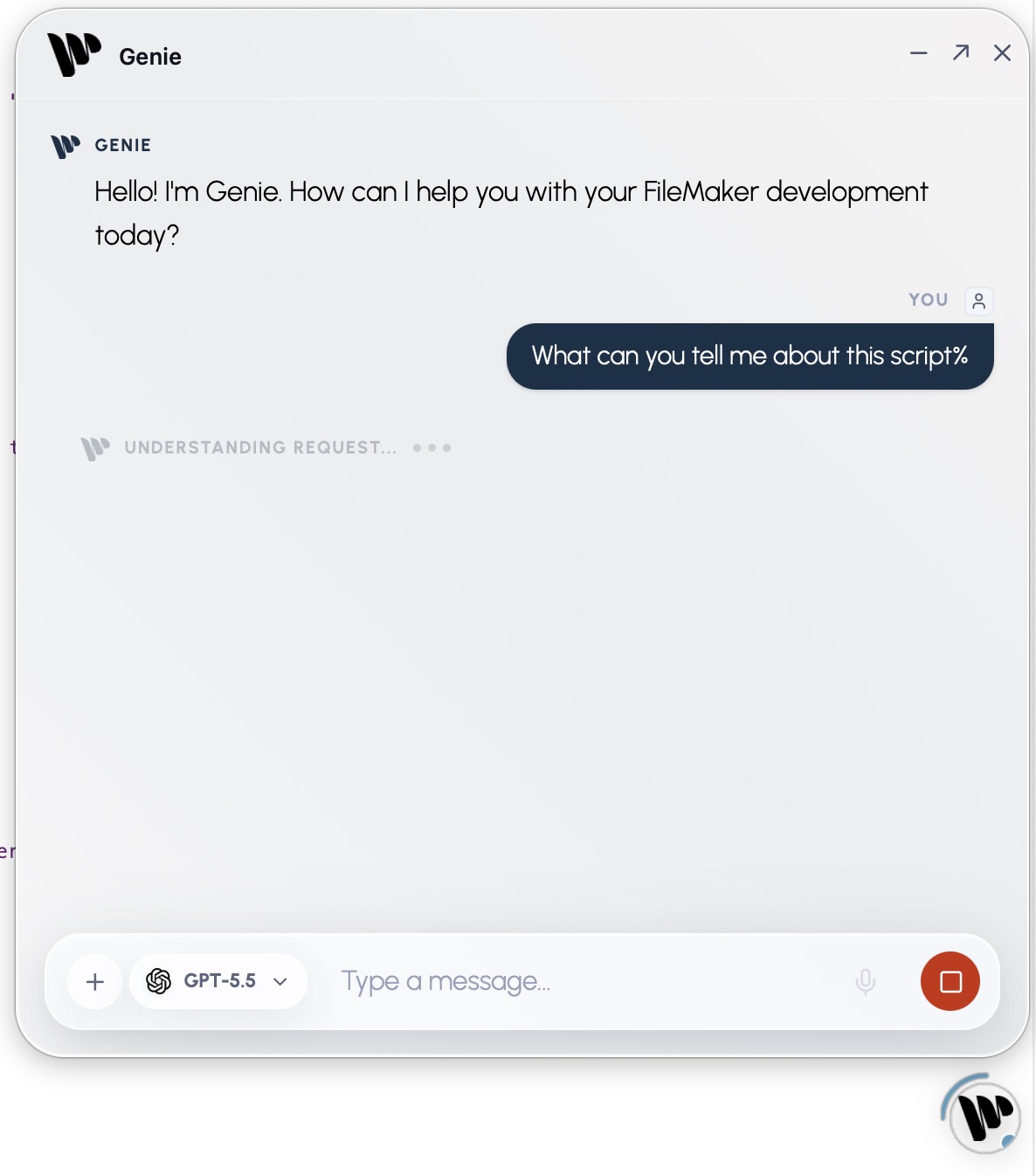
AGENT mode can start from the active FileMaker context instead of waiting for you to paste everything into a prompt.
The Genie Script Workspace Compact AGENT
One of my favorite parts of this release is the Genie Script Workspace Compact AGENT.
The full workbench is still there when you need it. It is the right place for bigger review, MCP handoffs, reports, staged work, and anything that needs a wider surface. But a lot of FileMaker development happens in a much tighter loop: you are inside Script Workspace, looking at the current script, trying to finish one practical change without breaking your rhythm.
That is where the Compact AGENT matters.
It brings Genie into the scripting moment without turning every question into a full workbench session. The compact panel can use the selected script steps, the active script, the current file context, and the surrounding FileMaker metadata as context for the request. You do not have to paste XML into a separate chat. You do not have to explain the table names from memory. You can ask from where you are already working.
The workflow is direct:
- select steps in Script Workspace;
- ask Genie to explain, review, or improve them;
- ask for a safer version of a small block;
- prepare a new script from the current context;
- keep the result reviewed before Create Script, copy, or apply.
Many FileMaker tasks are small daily edits:
- “Add safety around this parameter.”
- “Explain why this script breaks on an empty found set.”
- “Create a new script using the current layout.”
- “Review these selected steps before I apply the change.”
- “Use this active script as context, but do not replace it silently.”
The assistant stays close to the work, the context is explicit, and the final action is still yours.
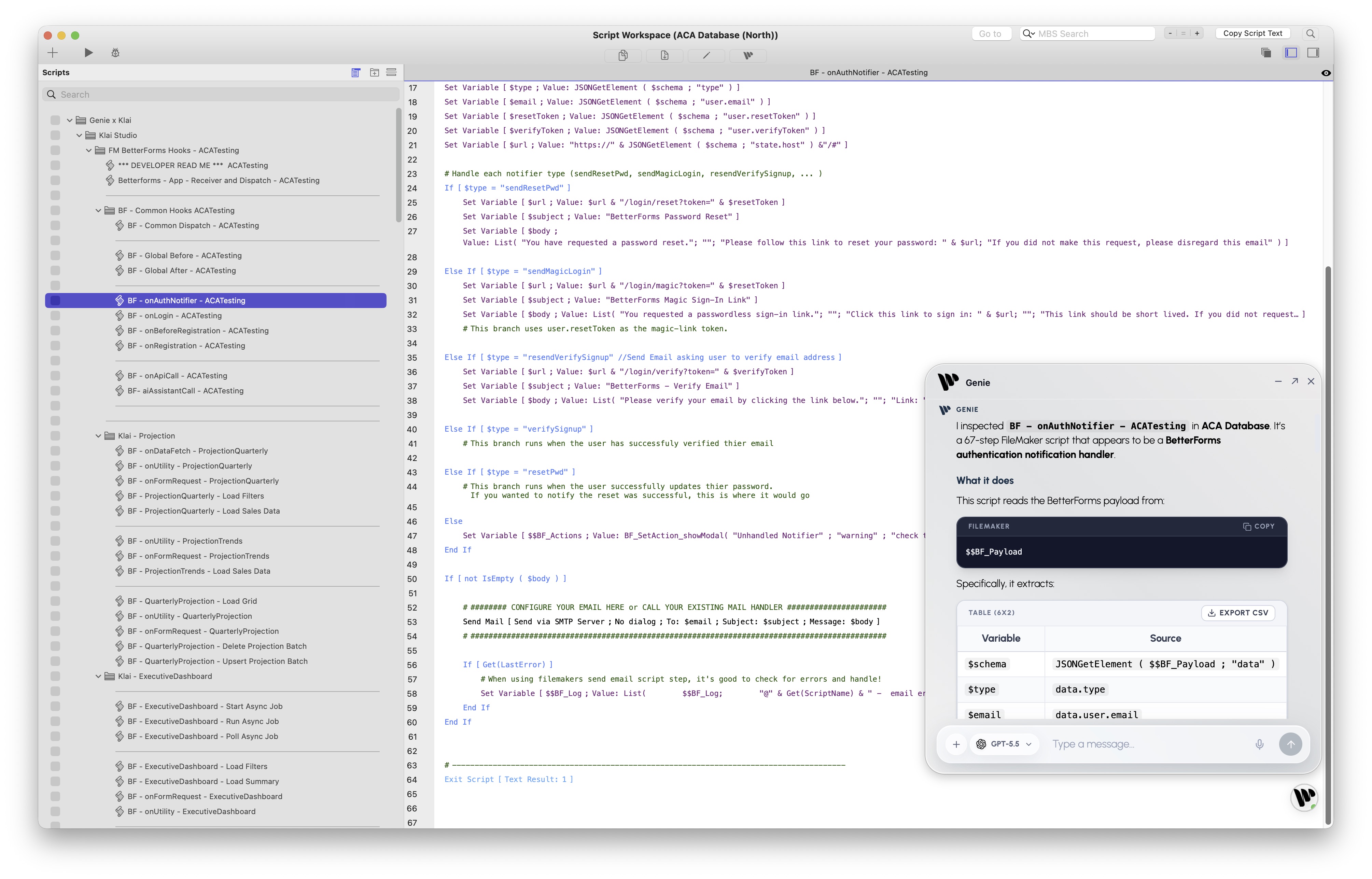
The Genie Script Workspace Compact AGENT keeps the AI loop close to the script you are already editing.
Workbench is the review surface for bigger work
Workbench is the other half of the product.
When work comes from the in-app assistant, Compact AGENT, Codex, Cursor, Claude, Klai, or another MCP-compatible client, Genie can keep that work staged and reviewable. This is the difference between “an AI tool wrote something somewhere” and “a FileMaker-aware workflow prepared work I can inspect.”
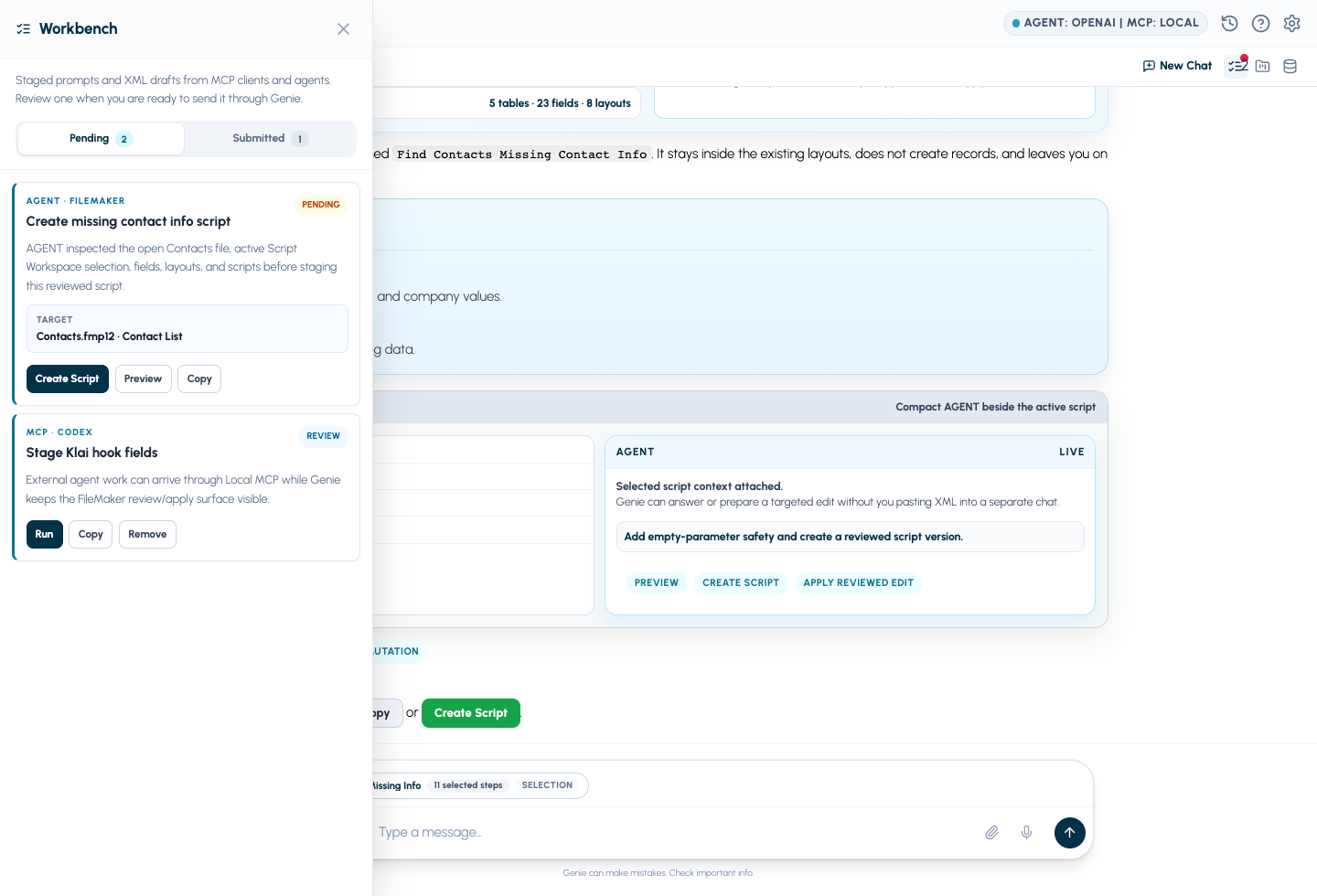
Workbench keeps in-app and MCP work visible, staged, and reviewable before Create Script, Preview, Copy, Run, or Apply.
This is especially useful for teams that are starting to use AI in more than one place.
You might use Genie directly inside FileMaker. You might use Codex or Cursor to build a web app that needs to understand your FileMaker schema. You might use Klai for a hosted app layer and Genie for the FileMaker side. The entry point can change, but the review boundary stays consistent.
That is the part I care about most: powerful automation without losing the FileMaker developer’s judgment.
Klai connects the FileMaker and web app sides
FileMaker development increasingly lives beside web apps, internal portals, dashboards, and hosted business tools. Klai is part of that story: it gives developers a faster path to web app surfaces, while Genie keeps the FileMaker side understandable, reviewable, and connected.
The goal is not just “AI writes a script” or “AI builds a page.” The goal is that FileMaker and the web app can be understood together.
That means Genie can help with the FileMaker scripts, schema, calculations, business rules, and reviewed creation paths while Klai helps shape the web app layer. Through Local MCP and Workbench, external agents can work across both sides with better context and a clearer review boundary.
Genie can help you understand and improve the FileMaker system, then coordinate that work with the app layer when the project needs both.
Ask from where you work
AGENT mode can be used directly inside Genie.
It can also support the way developers already work with external AI clients. If you prefer Codex, Cursor, Claude, or another MCP-compatible client, Genie can expose controlled Local MCP tools so the AI client can work from FileMaker context and stage work back into Genie for review.
That gives you two strong paths:
- Live in-app help: ask Genie from the FileMaker workflow, including Script Workspace.
- Favorite AI client: let an external agent inspect context and prepare work through Local MCP.
The point is not to force one interface. The point is to keep FileMaker context and review in the loop.
Create Script reduces clipboard friction
Earlier AI workflows around FileMaker often depended on clipboard gymnastics. Copy XML. Paste XML. Re-copy. Repair. Paste again.
Genie still supports copy and preview workflows because they are useful, transparent, and safe. But Genie 2.3 also moves further toward direct reviewed creation where supported.
With Create Script, a generated script can become a real FileMaker script through Genie’s reviewed flow. Existing scripts are not silently replaced. For edits, Genie keeps the target and review path explicit.
That is the balance I want:
- less manual paste work;
- less hand-built prompt context;
- more native FileMaker awareness;
- visible warnings and review;
- deliberate final action.
Project rules make the output feel like your file
The next important piece is project conventions.
Every serious FileMaker developer has a style. Naming conventions, preferred error handling, layout patterns, logging rules, security assumptions, plugin usage, deployment habits, and business-specific constraints all matter.
Generic AI usually forgets those details unless you keep repeating them.
Genie can keep project rules close to the work. That means the assistant can prepare output that better fits the file you are actually maintaining:
- use your naming conventions;
- follow your script structure;
- respect your preferred error handling;
- account for plugin-compatible functions when they exist;
- remember when a workflow should produce a preview, a new script, a calculation, a report, or a staged Workbench item.
This is one reason Genie should feel more like a product than a prompt box. It is not just asking a model to be clever. It is building a repeatable FileMaker development workflow.
Settings now match how developers actually use models
Genie is not trying to force one model or one vendor into every workflow.
The new settings surface reflects that. You can configure provider keys, choose routing, use hosted models, use compatible local endpoints, and expose Local MCP for the tools you already use.
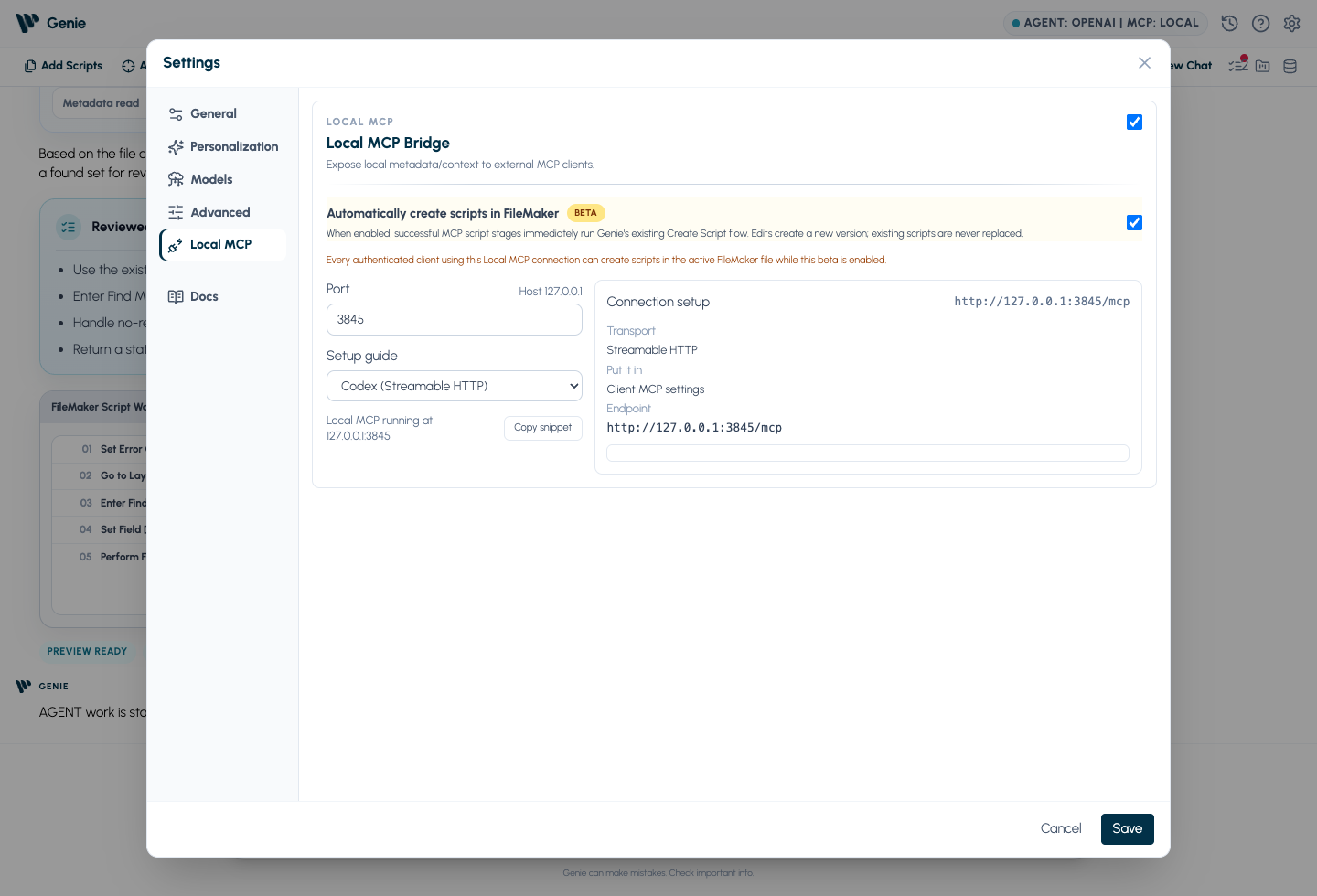
Local MCP lets external agents work with FileMaker context while Genie remains the review and apply surface.
Provider choice matters because FileMaker teams have different constraints:
- some want OpenAI for strong agent and coding behavior;
- some want Anthropic, Google/Gemini, or xAI depending on the task;
- some need Custom or Local OpenAI-compatible endpoints;
- some want separate model roles for coding, reasoning, or coordination.
The important part is that Genie owns the FileMaker context and workflow boundary. The model is a choice. The FileMaker-aware loop is the product.
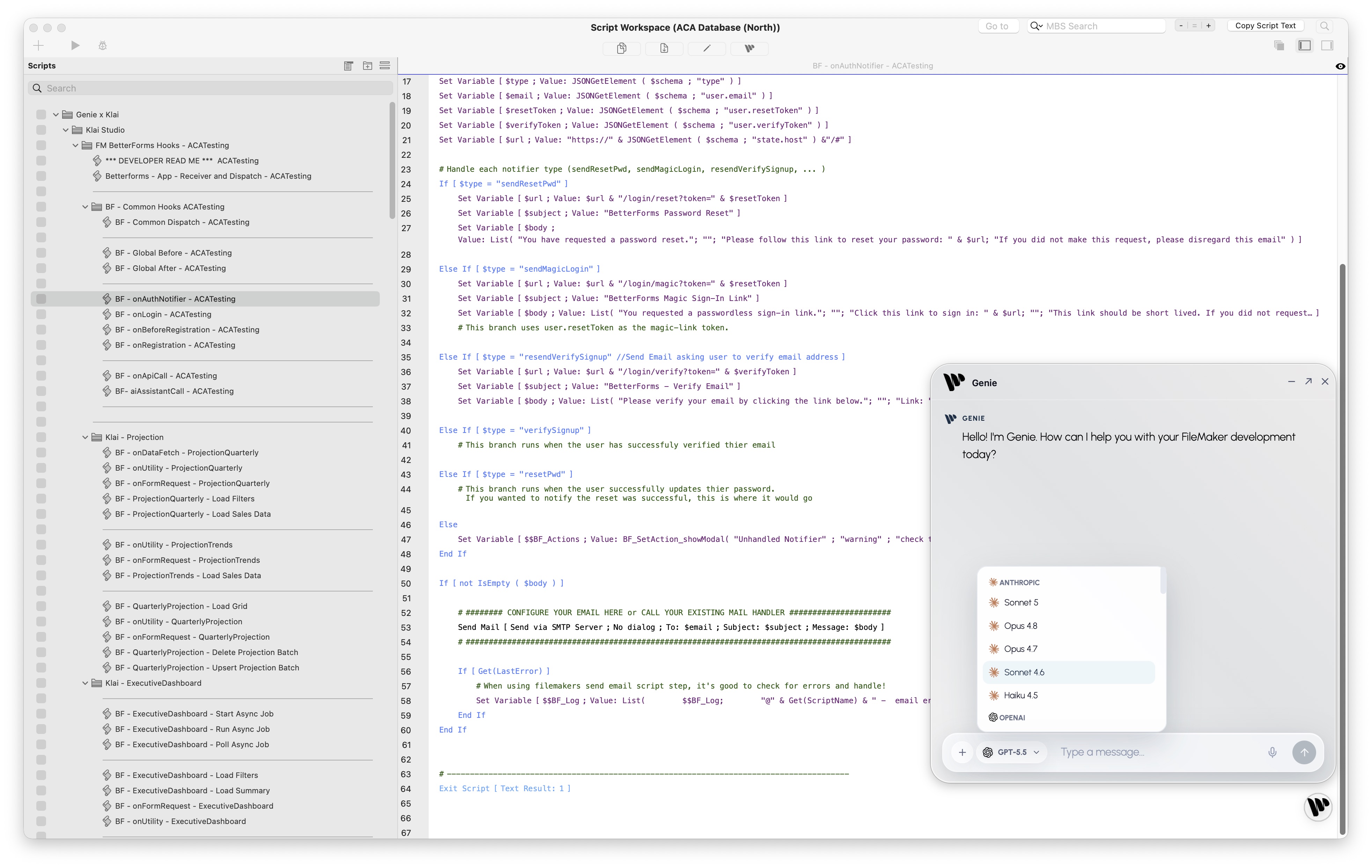
Genie keeps provider choice in the workflow while the FileMaker context remains the product layer.
One prompt can produce analysis, charts, and documents
Genie is not only for scripts.
AGENT mode can use FileMaker context to prepare useful output around the work, not just code snippets:
- AI in calculations;
- custom function help;
- script explanation and code review;
- FileMaker system analysis;
- read-only reports;
- markdown tables;
- charts;
- downloadable documents;
- PDF exports;
- image attachments for supported vision-capable models;
- data and layout handoff workflows where review is required.
That means one prompt can ask for more than one artifact:
Explain this workflow, identify the risky branches, produce a table of the variables, and draft a short report I can share.
That matters because real FileMaker development is not only code generation. It is understanding business rules, checking data, explaining behavior, documenting decisions, and coordinating changes across systems.
Genie is becoming useful across that whole loop.
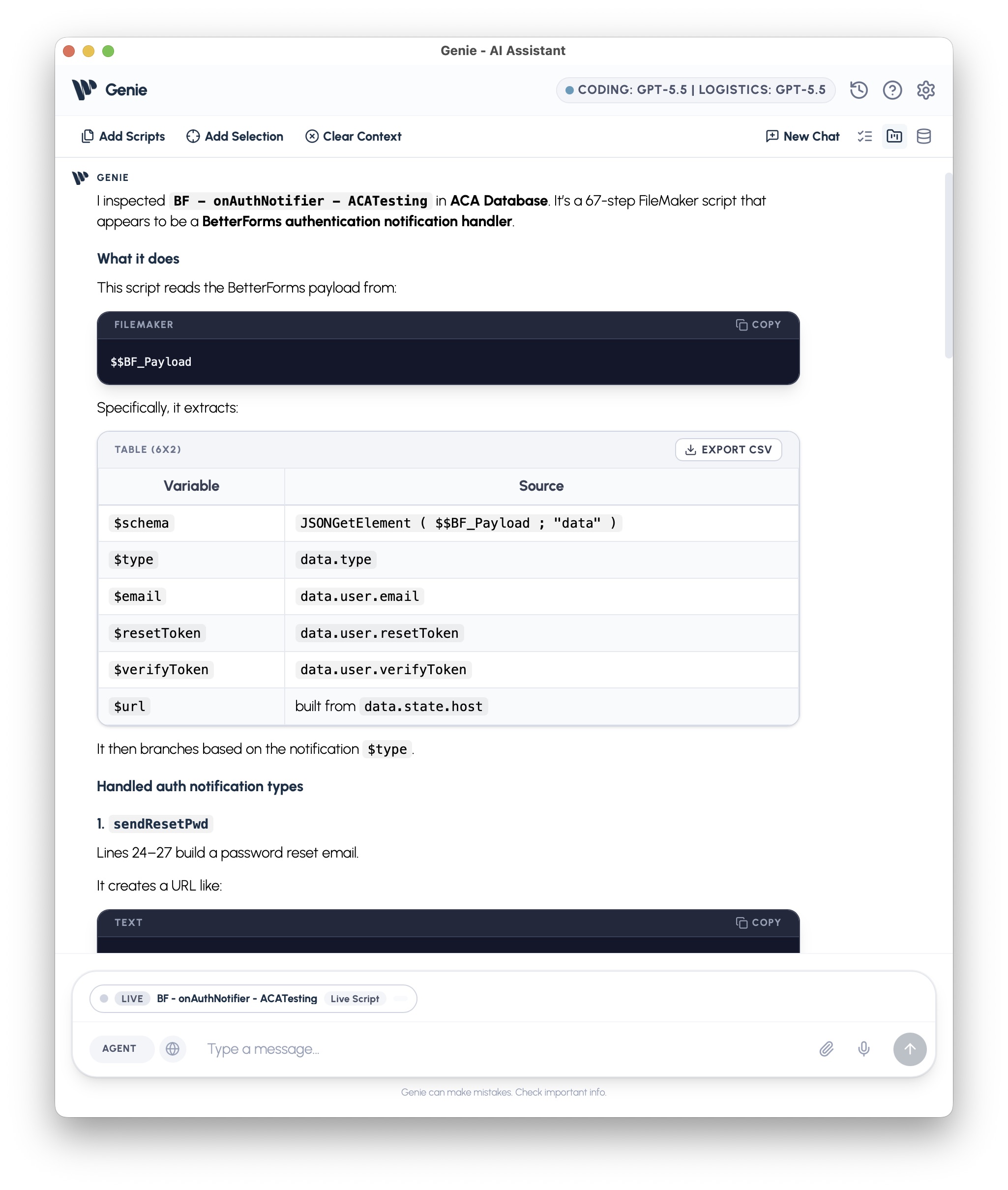
AGENT mode can produce structured analysis, tables, summaries, and developer-ready explanations from the current FileMaker context.
Monthly pricing makes adoption easier
The release is also changing how people can adopt Genie.
Not every developer or team wants to jump straight from free inspection to a larger annual purchase. Sometimes the right path is to understand the system first, then use Genie on real client work, prove the workflow, and expand from there.
Free makes it easier to understand the system in front of you, while Solo, annual, and team options support the work you want to create, review, and apply. The important part is lowering the friction between “I tested this” and “I can actually use this on my next FileMaker project.”
AGENT mode, Compact AGENT, Workbench, Local MCP, BYOK provider support, and reviewed creation are not separate experiments. They are part of the same paid workflow.
The pricing should make it easier to start using that workflow today instead of waiting for a future platform cycle.
Why this is different from platform AI
Claris is building useful AI into the platform, and that is good for the ecosystem. FileMaker is moving toward richer AI context, MCP, and agentic development. You can see that direction in Claris’ own pages for agentic development with FileMaker, FileMaker 2026, and Claris MCP.
Genie is different because it is developer-first, product-first, and review-first today. It is built for people who need to work across real FileMaker systems, existing versions, external agents, provider choices, MCP workflows, script review, metadata inspection, calculations, plugin-aware work, and practical handoff to web apps or internal tools.
The point is not to replace FileMaker. The point is to make FileMaker development fit the way AI-assisted work is actually evolving.
Claris is publicly moving toward FileMaker as a first-class target inside external agentic coding tools. Genie’s lane is related, but more immediate and more product-shaped: put the AI assistant inside the FileMaker workflow, give external agents a solid local MCP bridge, keep Workbench as the review surface, and let the developer decide when prepared work becomes real FileMaker work.
Genie can sit close to the file. It can expose a deep local MCP surface. It can stage work from external tools. It can help a Klai web app and a FileMaker file move in sync when the developer chooses that path. And it can do all of that while keeping review and final action visible.
That is the difference.
Why jump in now
Genie 2.3 is the foundation for where the product is going.
The workflow is already useful today:
- less clicking;
- less manual context;
- less clipboard work;
- better understanding of the open FileMaker file;
- better native help inside Script Workspace;
- stronger MCP coordination with external agents;
- better Klai handoff for FileMaker plus web app work;
- easier monthly adoption after free inspection;
- more reviewed creation paths inside FileMaker.
If you already build serious FileMaker systems, Genie 2.3 is worth testing on a real workflow: one script, one report, one data check, one MCP handoff.
That is where the value shows up. Not in a polished toy demo, but in the moment where the agent understands enough of your actual file to save you real development time.
Genie is not just an AI integration for FileMaker.
Genie is FileMaker AI that understands where you are working.
Full documentation: docs.geniewave.com
Download Genie: geniewave.com/genie